Start your first topical drift crawl in minutes
Upload a URL list or sitemap, cluster pages by topic, and surface URLs that drifted from their original intent — before they dilute rankings and internal link signals.
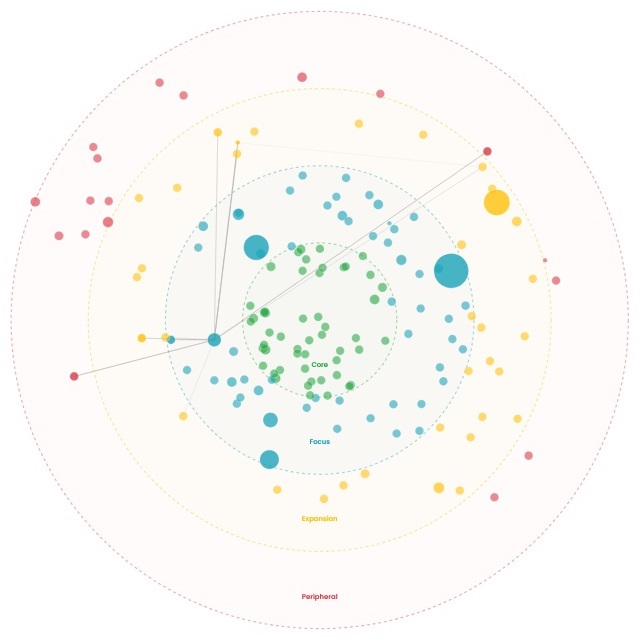
How the crawl works
Upload a URL list (or sitemap), and Topical Drift does the rest—content extraction, clustering, drift scoring, and reporting.
Add a Google Search Console export if you have it. It helps us prioritize fixes by real demand (clicks, impressions, and queries).
Upload your pages
Start with a URL list or your sitemap XML. Optionally include a GSC CSV export to connect results to performance.
We extract & embed
We crawl pages, extract the main content, and generate embeddings automatically— no embedding files required.
Cluster by topic
Pages are grouped into semantic clusters so you can see your site’s topical layout and where overlap or fragmentation is happening.
Review the map & action plan
Explore the radial map, inspect drifting URLs, and export a prioritized checklist for content, intent alignment, and internal linking fixes.
What you’ll need to get started
You only need a URL list or a sitemap. Upload that and we’ll crawl, extract content, and build the crawl automatically.
GSC data is recommended (not required) so we can tie drift to real demand—queries, impressions, clicks, CTR, and position.
URL list (TXT/CSV) Required (choose one)
Upload a simple list of URLs—one per line (or a CSV with a URL column).
Sitemap XML Required (choose one)
Use sitemap.xml to generate your page list and start the crawl.
Google Search Console export (CSV) Recommended
Adds demand + performance context (queries, impressions, clicks, CTR, position) so your drift report prioritizes what matters most.