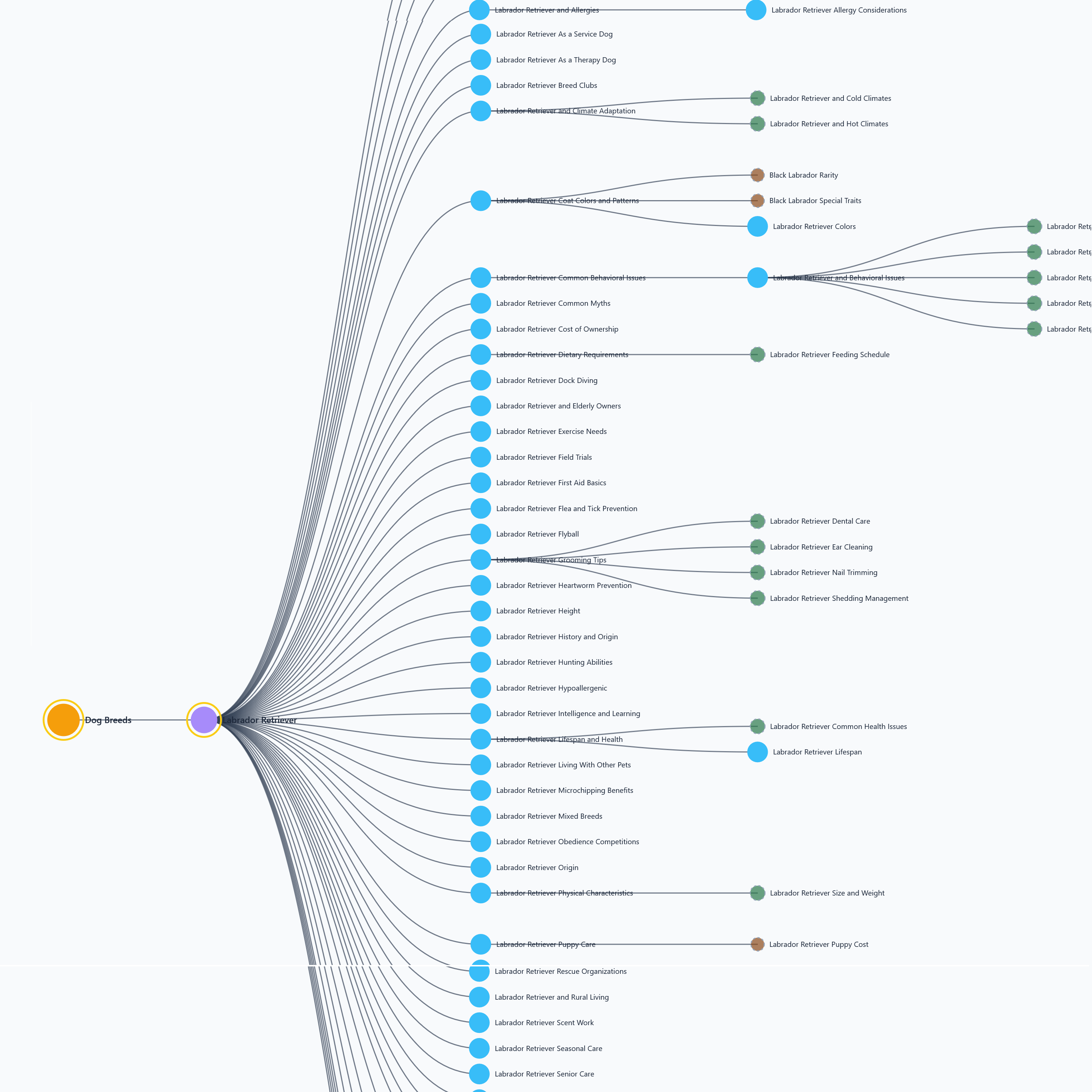
Let the Generator do the work. Enter your macro and seed — the pipeline discovers every topic, classifies every page, generates URLs, and maps the internal links automatically.
Generate My Topical MapLoad the built-in Golden Retriever example map in the editor — no account needed. Explore every node, layout, and export before you commit to generating your own.
Explore the Starter MapLoad your JSON file directly into the editor. Works with any topical map JSON — pipeline output, editor export, or hand-crafted. No account needed.
Open the EditorFrom two inputs to a complete content architecture
The generator runs a full pipeline — SERP analysis, entity extraction, topic canonicalization, hierarchy classification, URL generation, and internal linking — automatically. You get the finished map ready to edit and export.
Read the methodologyEnter macro + seed
Provide the broad subject area (macro) and the specific topic (seed). Example: Dog Breeds → Golden Retriever.
SERP + entity analysis
Real search results analyzed to discover subtopics, extract named entities, identify FAQs, and surface competitor content structures.
Classify and structure
Every topic classified as Standalone, Section, Hub, or FAQ. Duplicates merged. Hierarchy and tiers assigned automatically.
URLs + linking plan
Canonical URLs generated from the hierarchy. Every edge gets anchor text, placement hints, and required vs optional status.
Review in editor
Your finished map opens in the visual editor — four layouts ready to explore. Edit, re-parent, add nodes, fix URLs.
Export and execute
PNG for clients, SVG for print, CSV for your content calendar, JSON to reload or pipe into your CMS.
A complete topical authority data model
Not just a list of topics — a structured, machine-readable blueprint with every node classified, every URL planned, and every link mapped.
Topic Nodes
Every Topic and Subtopic is a node with ID, label, slug, tier, and node type. Macro → Seed → Topic → Subtopic hierarchy established automatically.
FAQ Nodes
Questions extracted from SERPs and PAA — classified as FAQ nodes and attached to the correct parent page.
Hub Pages
Topics with multiple children automatically marked as Hub pages — gold ring in editor, flagged in JSON for your CMS template.
Sections
Thin topics become heading + content blocks inside a parent page. No URL generated. Dashed border in editor.
URL Architecture
Canonical URLs generated from parent URL + slug. Every standalone page gets its own URL. Sections inherit the parent URL.
Internal Linking Plan
Every edge carries recommended anchor text, placement hint, and required vs optional status.
Entities + Aliases
Every node enriched with named entities and alias phrases. Searchable in the editor. Exports to CSV and JSON.
Confidence Scores
Every node carries a 0–1 confidence score. Low-confidence nodes flagged so you can review before briefing content.
Export Everything
PNG (client presentation), SVG (print-ready vector), CSV (content calendar), JSON (pipeline reload, CMS, Neo4j, D3.js).
Visual Editor Included
Generated map opens directly in the editor. Edit any node, re-parent, add children, fix URLs, switch between four graph layouts.
What runs under the hood
Seven stages — from raw seed keyword to a fully structured, entity-enriched topical authority graph.
Read the full methodologyTwo ways to work with your topical map
The Generator creates the map. The Editor refines and exports it. Most users do both — generate first, then edit.
Enter a macro and seed — the pipeline generates your complete topical authority map automatically. Best when starting a new site or topic cluster from scratch.
- AI-powered topic discovery from SERPs
- Entity extraction and alias enrichment
- Automatic page / section / hub / FAQ classification
- URL architecture and internal linking plan
- Confidence scoring on every node
- Up to 3 maps per month (fair use, free in beta)
- Opens in editor automatically
Review, edit, and export any topical map. Load a generated map, import the starter map to see what a complete map looks like, or load your own JSON.
- Load any JSON topical map file
- Load the Golden Retriever starter map — see a complete example with no account
- Add, edit, duplicate, re-parent, and delete nodes
- Four layouts — Force, H-Tree, V-Tree, Radial
- Search, minimap, map control panel
- Export PNG, SVG, CSV, and JSON
Quick answers
The most common questions about the Topical Map Generator.
Load the Golden Retriever starter map in the editor — no account needed. It is a complete AI-generated topical map with all node types, hub pages, FAQ nodes, entities, aliases, confidence scores, and a full edge set. Click nodes, switch layouts, and try the export. Once you know what a finished map looks like, generate your own with the Generator.
- PNG — viewport or full map at 4800px+ (client presentations)
- SVG — vector format for print or Figma/Illustrator
- CSV — all node fields for your content calendar spreadsheet
- JSON — full graph for pipeline reload, CMS, Neo4j, or D3.js
Yes. The editor is completely free with no account required. The best starting point is the built-in Golden Retriever starter map — it shows a complete generated map with all node types, hubs, FAQs, and edges.
Build your topical authority map before you write a single word
Enter a macro and seed — get a complete site architecture with nodes, hub pages, URLs, internal linking, and entity data in under 60 seconds. Not ready to sign up? Load the starter map and explore first.